SartodiNapoli's Shirt, Tie & Pocket Square Company

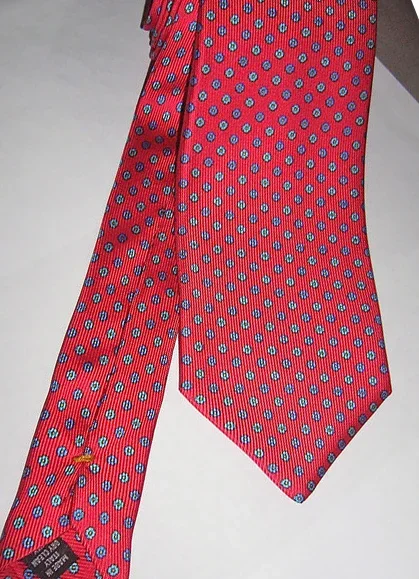
red tie 2 tweaked.webp

red tie tweaked.webp
ties  red tweaked 3.webp
 
yes, hold on since i am playing with my camera with several color lights etc. Not bad for my first ever day as photographer. God lights me!
 
Sartodi - I moved this out of DT and back into MC. If you fucking post anything other than ties and squares, and I do mean ANYTHING, I will lock this up and move it back to DT.

Entiendes, puto?
 
Yeah it actually does look nice.

Sartodi - I edited the post for you. No need to put up more than three pictures per tie. People get annoyed scrolling through too many of the same pic.
 
This pic is on different mode than macro, it is a bit unsharp, but gives the real tone of the tie.

All are tweaked with iphoto ( too dumb for photoshop)

any help/ clue? opinion about the photos please?
printed red tweaked 4 bad.webp


Edited; thanks Rambo, today posting as much to have feedback, not of the ties itselves, but of the photo, what is ok, and what can be improved.

Too many parameters for an analogue man as me.

Edit;

There is an option of rotate the pic on iphoto, that does not rotates as i´d wish it would do, but gives a strange zoom like rotation, noted it on the last tie that was a twill weave, it made the noire psychodelic undesired effect when used it.

I want to rotate the pics normally, to have them in 90 degrees, as if you were wearing them.
 
firstly, Colour balance is a little off on your first photos. It looks like you didn't fire the flash to freeze the frame. There may not be enough ambient light to properly photograph the ties. So, you need to fire the flash to get a focused photo.

Easiest way of explaining it is that your camera's shutter stayed open for too long and that is why you got the camera shake.

Some of your photos are bluish, a little 'cool' is what photographers would call that.

In the photo below, I rotated the tie, cropped it and tweaked the colour balance to get it a little closer to the blurry one.
printed redt weaked 2.webp
 
Last edited:
Yeah, igentPhoto does this odd zoom/straightening. That's dumb! I also tried to use Pixlr, which is basically a web photoshop, but that does the same thing.
 
Yeah, igentPhoto does this odd zoom/straightening. That's dumb! I also tried to use Pixlr, which is basically a web photoshop, but that does the same thing.


I guess you used a pro version of Photoshop right? If any can pm me about where to get it ( you know what i mean)
will appreciate.

Also, has Photoshop a basic settings like Iphoto, for newbies as me avoiding the advanced ones that i will never use?

Any other program you recommend me, just want to tweak, rotate without that strange side effect and nothing more.

It seems i will have to spend more time on the f. computer than the time i invested on learning tie making...

It seems one has to reach master level on everything if i want to sell, on the contrary, my exposed ones only achieved on scamming, lol. I also had a loser today that reached bad level on moderation, ( not on this forum of course). Any of my hater group, if he defended tackys, i am pretty sure he is.
 
Look at Adobe Lightroom. That has some photoshop features, it is pretty straight forward.
The easiest thing to do is just pay adobe $10 a month and get a subscription, but you could always download a torrent?
 
I will download it tomorrow and try it. So with my old basic camera, can i do it?

What seems i can´t do is to focus manually and get the grain quality of those big lenses ( well looked obvious right?)

Also i am getting the best results on this camera settings;

To scan documents the self portrait at night icon ( now picturing a shirt fabric book, and with macro and manual where blurry)

To the ties with the manual ( gets more grain) but do look more natural

Macro, does macro but looks fake/unreal.

Maybe is time to take new pics of my linen handmade pochettes that were my most sold product last year and now are stopped.

Why?
Yes, it is easier. Considerably. You'll get it, I'm certain of it!
 
Last edited by a moderator:
P1040781 Topazio 3 tweaked.webp


Rambo or Sarto: please delete the other image, this one is colour corrected.
 
I'd like a tie for assisting you with photography, can we work something out?
 
I'd like a tie for assisting you with photography, can we work something out?


One fella told me the opossite as you, so to put iso on 50 while you said 200. He said it gave too many artifakts.

I got any idea, but will try with 50.

also,

What seems i can´t do is to focus manually and get the grain quality of those big lenses ( well looked obvious right?)

Also i am getting the best results on this camera settings;

To scan documents the self portrait at night icon ( now picturing a shirt fabric book, and with macro and manual where blurry)

To the ties with the manual ( gets more grain) but do look more natural

Macro, does macro but looks fake/unreal.
 
Setting your ISO at 50 would produce a slightly cleaner image, there is more noise the higher you set your ISO, but 200 ISO is a very reasonable ISO. . Though in your older camera, yes, you may want to shoot on as low an ISO as possible.

Artifacts and noise happen with digital photos when the sensor cannot correctly assign colour to the pixel, as well, if a tie has more detail than the camera sensor can handle sometimes it can resolve in weird colour or zebra-stripy looking lines, this can be caused by lower megapixel cameras. I think your camera has 6 megapixels.

The photo above does have some odd looking noise in those bars, I didn't catch that earlier. But c'mon, even I as a photographer wouldn't complain about that in the context of showing options to people here on a forum, we know what we're looking at.

If you wanted the noise/moire patterns/artifacts resolved more easily you'd have to shoot with a higher quality camera, like a dSLR, which should solve most of those problems. Or, you go to a medium format camera, which has extremely high mega-pixel counts and incredibly precise recording capabilities, but that'll set you back $40,000 like the one my boss has.
 
Stick with whatever mode works best, if it is the night portrait mode, go with it. It is a lot easier to just colour correct after than worrying about too many settings. That first photo that I cropped, rotated and colour corrected, whatever mode you used there, keep using that one.

I'm a photographer. so by default, I go to a manual mode. So what works for me, mightn't work for you, there is nothing wrong with that. Though, I (jokingly) denounce tacky camera modes, it is a profanation of classic manual photography.
 
I would like to could do decent pics with my camera. Right now got tons of deubts, the banksters bribed my lawyer so i lost the 2000e i paid him, so the only thing i can do is to improve my light setup and try to buy locally second hand pro lights. On Mediamarkt where almost 300e and looked cheapo.

Will try on the same setup with 50 iso to see the diference.

Not sure if my camera had 4 or 6 megapixels.

Edit; should i set up the white manually on the camera, using a white page and setting up some controllers, or better to use the auto mode?
 
I think that Arnathor has made some good comments in regard to photography, and the print silk tie with the small flower pattern above looks very nice indeed.

Two things that you can easily do to improve photographs are:
- Get a tripod to hold your camera steady; and
- Have a light/lamp with something white and translucent in front of it to diffuse the light (that is, still give you plenty of light but not direct light).

I'm really tempted to buy the reddish silk print tie with the small flower pattern from you. It would be great to see some nice photos of other ties and fabrics.


I am trying to buy those sets for the lights, second hand locally if possible, new cost circa 300 on Mediamarkt and looked crappy, also a tripod, by i am 1,92 meters tall, already got an old tripod from the Polaroid times from 1986, is as pistol of big, and as well can´t be focuses looked totally down right, only at front.

Sadly i can have them only here at home, not in Naples where i only have a mobile phone and go out at 5,30 am and return 10pm from Mon to Sat, and Sunday i am visiting as much churches and congregations as I can.

Rate my pics today. some on night mode, others on macro, this time ISO 50 flash on. More tomorrow...
Purple 7 folds.webp
Purple blade.webp
Purple tweaked 1.webp
Golden jaquard3-7 fold tweaked.webp
pink jaquard 1 tweaked.webp
Golded jaquard1 front tweaked.webp
Golded jaquard2 back tweaked.webp
 
I prefer to avoid flash where possible and to use diffused light (as mentioned above, a bright light with a white, translucent cloth or other cover in front of it) instead.

More expensive cameras have a "hot shoe" fitting for an external flash, and the external flash can usually be turned up or around so that the light from the flash doesn't directly hit the object that you're photographing - you can get the light to bounce off the ceiling or wall so as to illuminate the object.

However, cheaper/smaller cameras only have an integrated flash that cannot be swivelled, so the flash always points directly at the object that you're photographing. This means that photos taken with a flash often look a bit too bright, and the light is usually a bit too harsh.

You don't have to get specialist photography lights. If you have a desk lamp that you can angle towards the ties, you could use that, by putting some white cloth (for example) in front of the light, in between the light and the tie. Just make sure that the light is not too hot or that the fabric isn't right next to the light, as there is a small chance that the cloth could catch fire if the light is very hot.

Natural light is also really good - if you've got a good spot outside that gets good natural light in the morning or evening, it could be a good place to take photos. Natural light can be a bit tricky, though, as you can struggle to find a good position without shadows and sometimes it's too bright, sometimes not bright enough!
 
A bit of diffusion would help, but to my eye everything looks alright. Colour balance looks a little off, but it is close to neutral, on my monitor things are reasonably sharp.
 
It might just be me but those pics lionlike they have too much flash and are overly bright.

So my yesterday pics were better?

Edit, on my yesterday pics, i had manual setting of white, maybe because that you said were bluish, today was auto mode.
 
They look very shiny and noisy. Shine could be the fabric though. Noise probably from the very low ISO you are using. I shoot on 100 ISO with custom white balance but that's under full studio/lights set up. Arnathor is the expert though I'm just self taught with a few tips from photographer friends along the way.
For what you are doing you are probably better off forgetting about the studio images and just finding a nice big window and set up a table next to it using the nice natural light from outside as your light, and take images from a few angles i.e rolled up from the front and flat on the back at a consistent angle.
I won't post any of my images in this thread but you can have a look on the website to see how they turn out. It's important though you get consistency with the angles your images are taken from and the way they are displayed.
 

Users who are viewing this thread

Back
Top Bottom